What does it read?
Paystubs, notices of assessment, T4s, bank statements, credit reports and MLS listings — the documents that actually arrive on a Canadian file, in the formats clients actually send them. Everything goes into one pass and is analyzed together rather than one document at a time.
That distinction is the whole point. A paystub read on its own looks fine. A bank statement read on its own looks fine. The problems live in the space between the documents, and that is where cross-referencing earns its keep: stated income against documented income, liabilities on the credit report that never made it onto the application, deposits in the statements that will need a source-of-funds explanation before a lender will accept them.
Reviewing documents in silos is what lets those items through. A human reader working through a forty-page package at the end of a long day is checking each file for internal consistency, not holding six documents in their head at once. The AI Underwriter holds all of them at once, every time, on every file.
What do you get back?
The output is not a wall of extracted text. It is a structured read of the file, organised the way you would want an assistant to hand it to you.
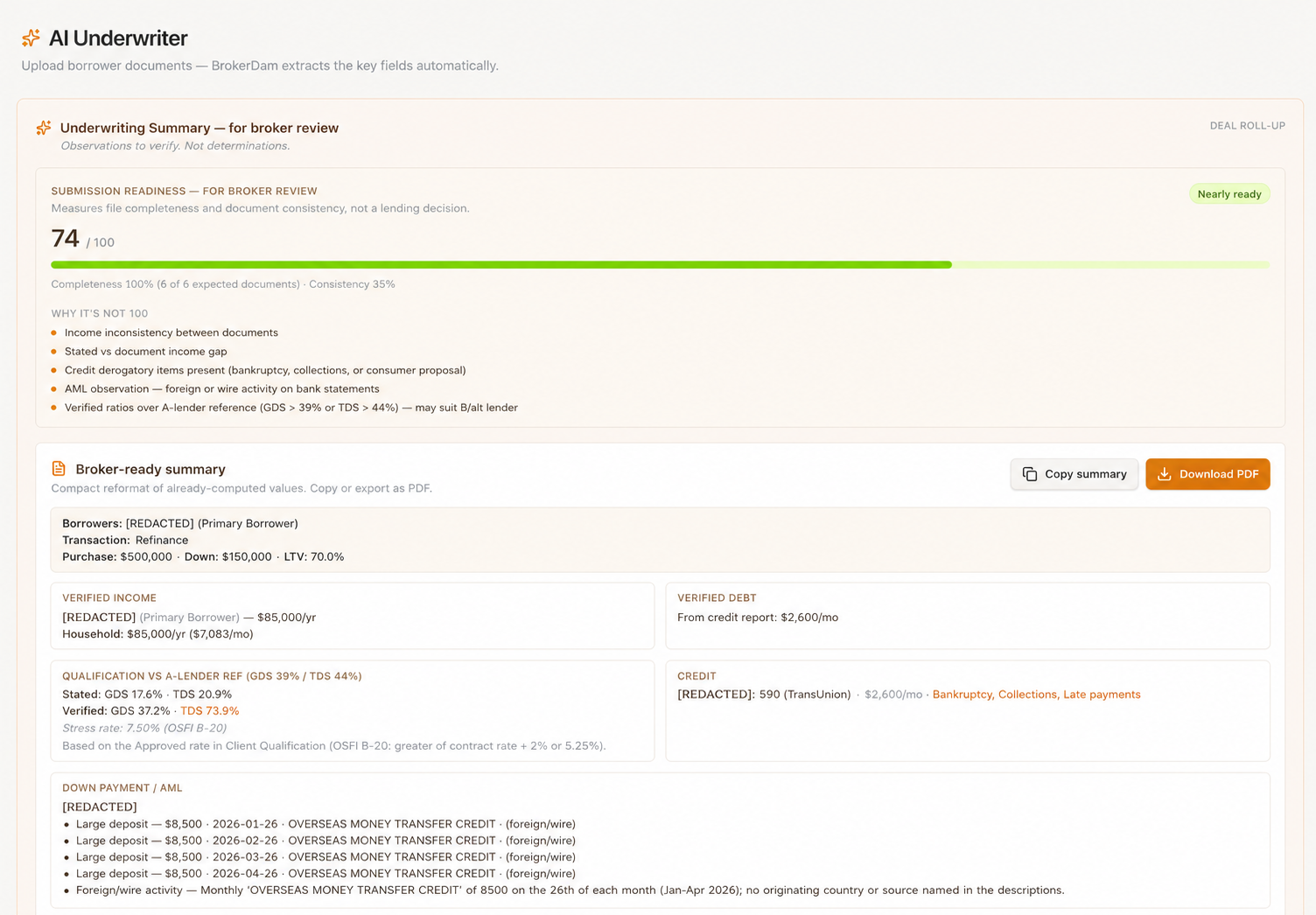
- A submission-readiness score. A single indicator of how close the package is to being submittable, so you know immediately whether this file needs ten minutes or a phone call.
- Verified income, debt, down payment and credit at a glance. The four numbers that decide the file, pulled from the documents rather than from the application form.
- GDS and TDS with the OSFI B-20 stress test. Calculated on the stress-tested rate and shown against lender caps — stated versus verified versus cap — so you are looking at the ratios the lender's system will produce, not the optimistic ones from the contract rate.
- A single flags list, with severity and source document. Not scattered warnings across a dozen screens: one list. Collections showing on the credit report, NSF activity on a bank statement, a CRA balance owing on an NOA, a large deposit that needs sourcing — each item tagged with how serious it is and which document it came from, so you can verify it in seconds.
- Per-document extraction summaries. What was read out of each file, so you can confirm a figure against its source without reopening the PDF.
- A broker-ready summary you can copy or export. The numbers, the flags and the reasoning in a form you can put in front of a client or use to frame the file for a lender.
What happens when a file doesn't fit?
Most tools stop at a red X. A ratio is over the cap, the file is marked as failing, and you are left to work out what would change that on your own.
When a file sits above lender caps, BrokerDam produces a Path to Qualification: the actual levers, quantified. The income level that would bring the ratios inside the cap. The debt reduction that would do it instead. The additional down payment that would get there from the other direction. And whether the file, as it stands, fits alternative-lender guidelines rather than needing to change at all.
That is diagnosis plus prescription. It turns the conversation with the client from "this doesn't work" into a specific, negotiable list — pay down this card, or find this much more down payment, or we go to a different lender — which is the conversation that keeps deals alive.
What does it NOT do?
It does not approve or decline. It has no lending authority, and it does not pretend to. Any tool that blurs that line should worry you: an approval carries risk appetite, accountability and a relationship with a lender, none of which belong to software.
The broker makes every decision — what the file means, which lender it suits, how it gets presented, and whether a flag is a real problem or a question with an easy answer. The AI does the reading, does the arithmetic, and shows its reasoning so you can check the work rather than take it on faith.
Why is it built for Canadian files?
The details that matter here are local. Ratios are calculated with the OSFI B-20 stress test applied, following Canadian GDS/TDS conventions rather than a debt-to-income model borrowed from another market. The document handling understands notices of assessment and CRA specifics, including a balance owing that a lender will want explained.
And the documents themselves stay here: customer data is hosted in Canada (ca-central-1). When you are feeding a system a borrower's most sensitive financial records, where those records live is a question your brokerage's compliance process will eventually ask.
Frequently asked questions
- What documents can it read?
- Paystubs, notices of assessment, T4s, bank statements, credit reports and MLS listings. They are analyzed together in one pass, not one document at a time, so figures in one document can be checked against the others.
- Does it approve or decline deals?
- No. The AI Underwriter performs analysis only. It has no lending authority and never issues an approval or a decline — the broker makes every decision.
- How are GDS and TDS calculated?
- GDS and TDS are calculated with the OSFI B-20 stress test applied and shown against lender caps, so you see stated, verified and cap figures side by side.
- Is client data safe?
- Client data is hosted in Canada (ca-central-1) and is used only to produce the analysis for your file.
Try it on your next file
The AI Underwriter is part of the standard plan — $99 CAD/month or $999 CAD/year, with everything included. Start a 14-day trial and run it against a real package.
Start your 14-day trialCard required · Cancel anytime.